ghosti
Dictate, record, transcribe, and summarize locally on your Mac and iPhone.
No cloud. No accounts. No LLM tokens. Free forever.
One email when ghosti is ready. Nothing else.
Three jobs.
One menubar pill.
- 01
Auto-records every online meeting
ghosti detects Zoom, Meet, Teams, Telegram calls and starts capturing both mic and system audio. When the call ends you have a transcript and a summary.
- 02
Voice-types into any app
Double-tap Right Shift, dictate, release. The cleaned text drops into Slack, Notion, your terminal — wherever the cursor was.
- 03
Captures notes by hotkey
⌥⇧N starts a note from anywhere. Speak, stop, ghosti writes the title and key points. The full transcript lives next to the audio.
Three things at once.
Without choosing one.
Record a Zoom call while it's happening. Drop a voice note in the middle. Dictate into Slack on the side. ghosti runs each job on its own queue — capture, transcription, summary — so nothing waits for anything else.
On Apple Silicon the Neural Engine and the GPU share the load: Whisper finishes the meeting transcript while the same chip writes your note's summary in parallel.
Live status from the menubar — three pills, three pipelines, no contention.
- 01
Voice keyboard, anywhere
ghosti installs a system keyboard that dictates straight into Messages, Mail, third-party apps. No round-trip to Apple — the same on-device models do the work.
- 02
One-press Action Button
Map the Action Button on iPhone Air to ghosti. One press starts a note. Press again, ghosti stops, transcribes, and saves.
A keyboard
and a button.
99 languages, recognised separately or mixed in one sentence.
Switch between Russian, Ukrainian and English mid-thought. Drop a product name in Latin into a Cyrillic sentence. ghosti keeps every word in the script you actually said it in.
“Push to ghosti сегодня, потім зробимо короткий stand-up з командою о 14:00.”
↑ ghosti writes that as one sentence. Brand names stay Latin. Russian stays Russian. Ukrainian stays Ukrainian. No language toggle, no re-recording.
No accounts.
No cloud middleman.
Recording, transcription, summary — every step runs on your own silicon. Notes leave your Mac only when they hop directly to your iPhone over your local Wi-Fi, end-to-end encrypted with a key your devices generate themselves.
- No login. Ever.
- No API keys to paste.
- No telemetry on what you say.
- Works on a plane, a train, in a tunnel.
Pair in 6 seconds
Settings → Sync → scan the QR.
Your iPhone scans once. From then on, deletes propagate in seconds, new notes arrive while the screen is still locked. No cloud account to forget the password to.
Files first. App second.
Every note and every meeting lives as a Markdown file plus an audio bundle in ~/Documents/ghosti/. Open them in Obsidian. Grep them in Terminal. Hand the folder to Claude Code, OpenAI Codex, or whichever local agent you trust — it sees a real filesystem, not a proprietary database.
~/Documents/ghosti/
├── notes/
│   └── 2026-04-28_19-04_q2-launch-plan/
│       ├── audio.m4a
│       ├── note.md
│       └── metadata.json
└── meetings/
    └── 2026-04-28_14-00_zoom/
        ├── mic.m4a
        ├── system.m4a
        ├── transcript.md
└── summary.md# In any agent CLI: Read every file under ~/Documents/ghosti/notes created this week. Group the action items by project and write a one-paragraph summary for tomorrow's standup.
Three devices. Zero cloud.
Your audio, transcripts, summaries and dictionary live inside two bundles on disk — one on the Mac, one on the iPhone. Sync hops directly between them over your local Wi-Fi with a key your devices generated themselves. A local AI agent reads the same files from Finder; nothing detours through a server we run.
- ~/Documents/ghosti/notes/
- ~/Documents/ghosti/meetings/
- Documents/ghosti/notes/
- Reads ~/Documents/ghosti/
- Pure file I/O
Real Mac and iPhone screenshots from the current build.
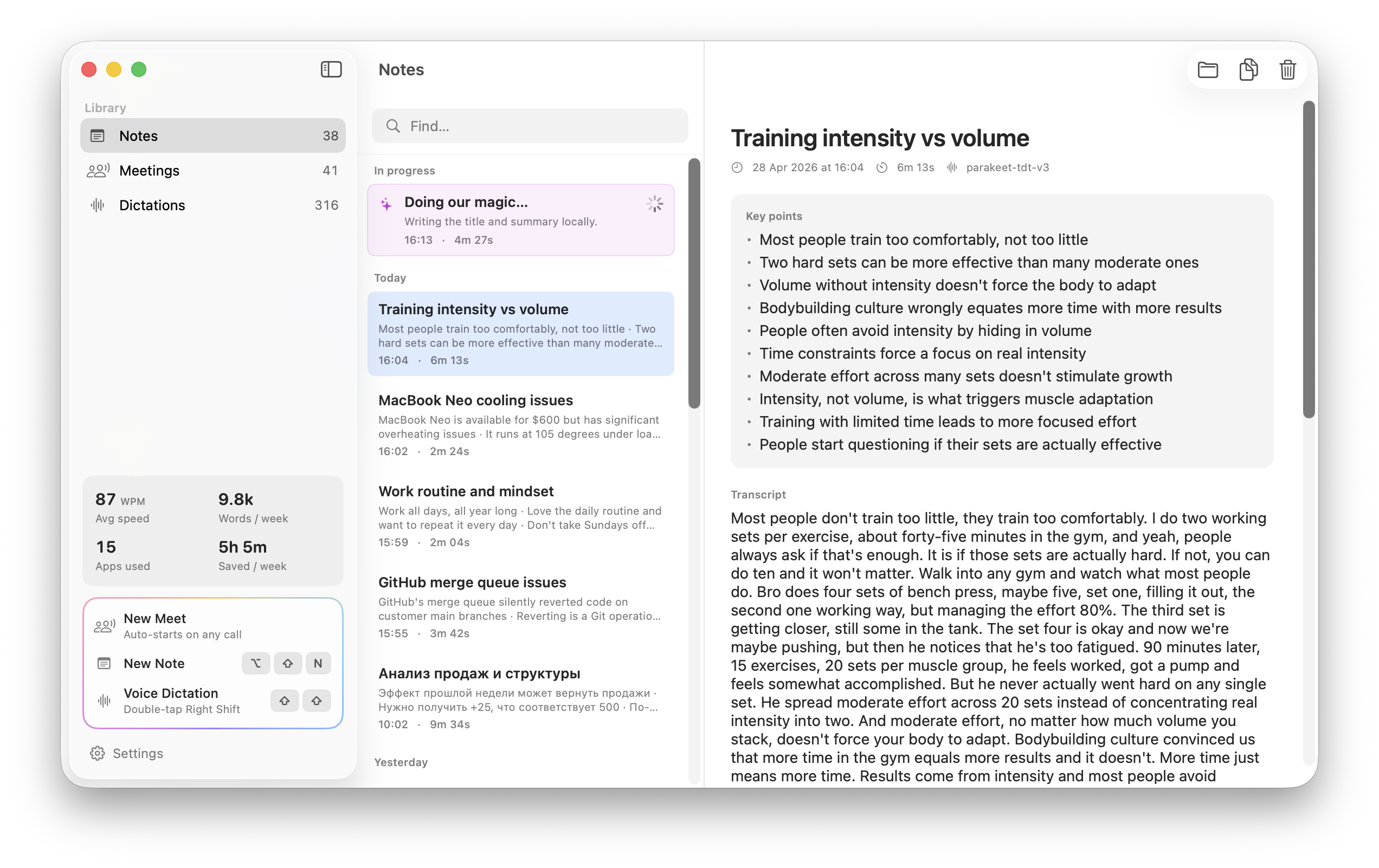
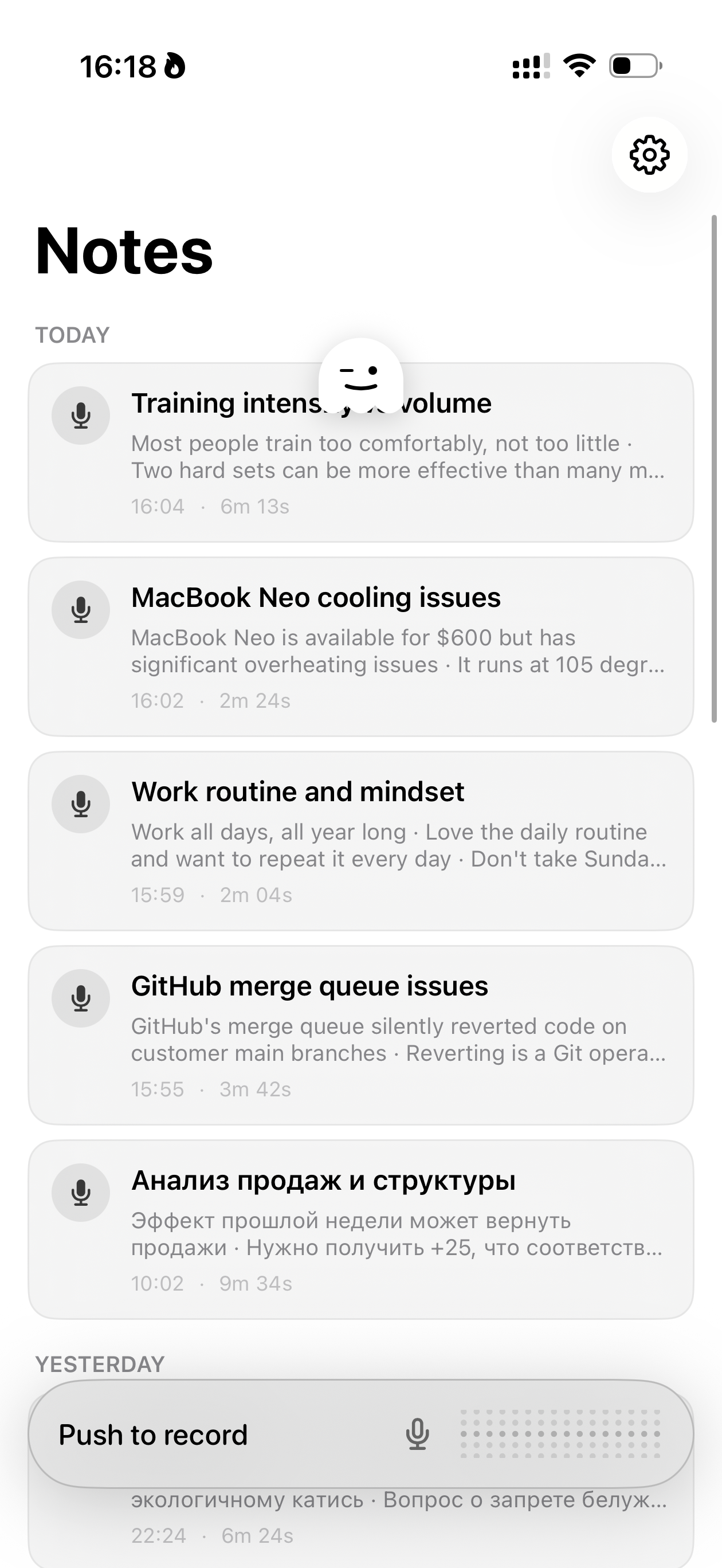
You already paid for the hardware. We don't want a second slice.
ghosti runs on the Apple Neural Engine and the same GPU that draws your wallpaper. No subscription, no usage tier, no “Pro” that unlocks the feature you actually want.
You’d pay around $147 / year for these features elsewhere.
Voice dictation tools average ~$120/yr. Meeting recorders average ~$180/yr. ghosti does both, on-device, and syncs across your Mac and iPhone — for free, forever.
No tiers. No paywalled models. No “Pro” that unlocks the feature you actually want. Every line below is included.
- All voice dictation — included
- All meeting recording — included
- All AI summaries — included
- All Mac↔iPhone sync — included
- All languages — included
- All future updates — included
Your conversations are not training data. They are not a database row. They are files in a folder you own.
Every cloud SaaS in the comparison below works the same way: you talk, your audio leaves your machine, a server you don’t control runs the AI, and the result lives in their database. You pay $10–$25 a month for the privilege. We think that trade-off is getting worse, not better.
The cloud will be broken into.
Future models will be better at finding leaks, breaking encryption, and joining the dots across breaches than today's attackers. Anything you upload now is a hostage to that future. Apple Silicon and a paired iPhone are the most-audited consumer endpoints on earth — start there.
Files. Not databases.
Your notes live as plain Markdown and audio files inside ~/Documents/ghosti/. Open them in Obsidian. Grep them in Terminal. Hand the folder to a local agent (Claude Code, Codex). When databases get sold, deprecated, breached, or 'pivoted', you lose access. Files in your home directory don't go anywhere.
Backups are your call.
Time Machine. Arq. iCloud Drive. A NAS over Wi-Fi. A USB drive in a fire safe. Because everything is just files, every backup tool already invented works on day one. We don't need a 'export your data' button — your data is already exported.
Two devices, one source of truth.
Mac and iPhone hold the same data, synced over your local Wi-Fi with a key only your two devices know. Lose the phone — your Mac still has it. Mac fails — your phone still has it. The cloud is not in the loop, so the cloud can't lose your stuff.
Built for the agent era.
Local AI agents need real files to read, not API calls to a SaaS you also pay for. ghosti's folder structure is the prompt context: 'read every transcript from this week and summarise the action items.' That sentence runs on your machine, against your files, with no upload and no per-token bill.
Want the receipts? Here’s every competitor, every price.
Get the email when ghosti opens up.
No drip campaign. No “7 ways AI will change your workflow.” One email, with a link.